Home · Blog · Home decor businesses
Step-by-step guide · Updated 18 November 2026
How to get Pinterest traffic for your home decor or furniture shop in 2027
A practical workflow for home decor and furniture shops: find the room and style searches that are growing, see which pins win right now, and link your pins to a product or collection page.
What you need
- AdWorq installed and unlocked in Chrome
- A Pinterest business account
- Product or collection pages to link to
The workflow
Screenshots are from AdWorq 1.1.9 on pinterest.com. Numbered callouts in each image match the numbered notes under each step. Click any screenshot to open it full size.
Step 1: Install AdWorq and unlock it
Add AdWorq from the Chrome Web Store, then open pinterest.com. Without a license the extension shows an Unlock full stats sheet instead of the numbers. One plan: $9 per month or $49 per year, paid on Stripe. There is no free trial.
- Get AdWorq opens checkout. After payment, AdWorq can unlock itself on this computer if the extension is installed.
- Already have a key? Paste it here. Lost it? Use Lost your key? and it is emailed to the address you paid with.

Step 2: Search Pinterest the way your customer would
Type a phrase a real buyer would use — for example “cozy bedroom decor” — into Pinterest search, or use Search Pinterest in the AdWorq popup. Scroll until a full page of pins has loaded; AdWorq only reads pins that are on the page.
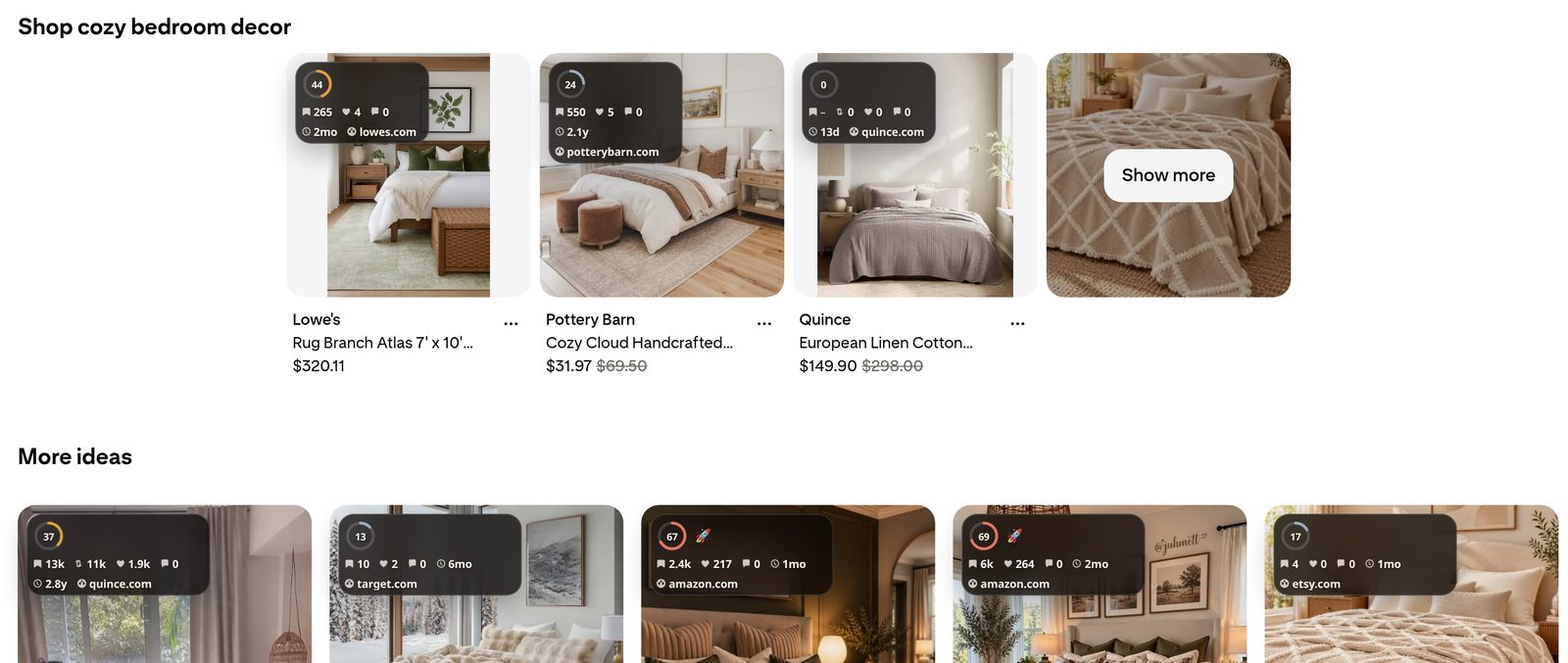
Every pin now carries a small badge: the Viral Score ring (0–100), 🔥 or 🚀 when a pin is growing fast for its age, then saves, repins, reactions, comments, pin age and the outbound domain.
Step 3: Hover a pin to see why it scores
Hover any badge for the full card. It shows how fast the pin is gaining saves and how the score was worked out, so you are not trusting a black box.
- Tier (for example WARM or HOT) and saves per day.
- Why this score: momentum, an age adjustment, and reach. The score is calculated on your computer from the stats Pinterest already loaded.
- ☆ Save adds the pin to your AdWorq shortlist; Download image saves the full-size image for study.
Room-scene pins can rank for years. Use saves per day and the date to tell an evergreen winner from a pin that is simply old.

Step 4: Keep only what is trending
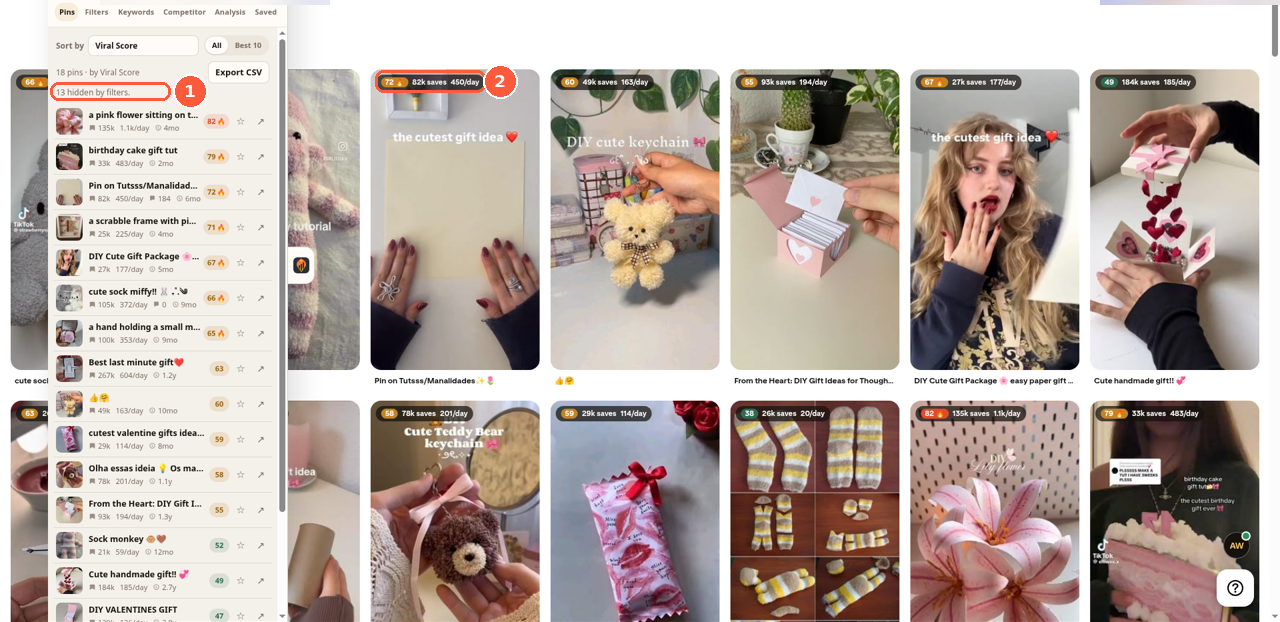
In Filters, turn on Trending only and, if you like, Hide promoted pins to see the organic winners for this room.
- The panel tells you how many pins your filters hide, so you know the list is a subset.
- With filters on, each remaining pin shows its saves per day right on the grid.
Step 5: Collect the keywords Pinterest is already using
Open the Keywords tab. The top table lists the interest tags on the loaded pins with a count, an average score and the top pin for each — use Copy all or Export CSV. Further down, AdWorq lists the search suggestions it captured while you typed.
- The Keywords tab.
- Related search — phrases Pinterest suggested around your search.
- Search box — autocomplete phrases captured as you typed in Pinterest search.
Room, style and material tags (“japandi”, “rattan”, “neutral bedroom”) belong in pin titles, board names and collection pages. AdWorq does not show search volume: Pinterest does not expose a reliable number, so none is invented.

Step 6: Look up competitor brands
The Competitor tab has two boxes and a report for the page you are on.
- Open a competitor: type a website (etsy.com, mystore.com) or a Pinterest @username.
- Search Pinterest without leaving the panel.
- Export report saves the report as a CSV.
- Posting cadence: how many dated pins, the date range, pins per week and per month.
- Top pins, followed by top domains and top tags.
Type a competitor brand’s domain or @username and compare cadence and top pins. Export the report if you share research with a team.

Step 7: Save your shortlist into folders
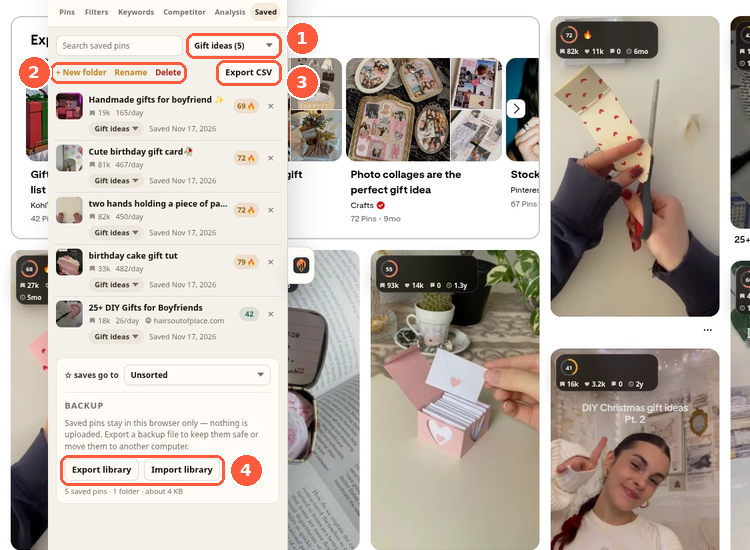
Every ☆ Save lands in the Saved tab, stored in this browser only.
- Pick a folder to view (here “Gift ideas”).
- New folder, Rename, Delete.
- Export CSV of the saved pins.
- Export library / Import library to back up or move to another computer.
One folder per room or style keeps references organised for your next photoshoot.
Step 8: Publish your own pin — linked to the exact page
Use what you collected — phrases, tags, title patterns, timing — not other people’s images. Make an original pin, put the main phrase in the title and description, and link it to the matching product or collection page. Styled room shots usually say more than a cut-out product photo.
Then give it time. Pins often keep collecting saves for months. Judge results in your store analytics (Pinterest referrals), not by impressions alone, and repeat the steps for your next keyword.
FAQ
When should I pin seasonal content?
Early. A common rule of thumb among Pinterest marketers is 6–10 weeks before the moment (holidays, weddings, back to school), so the pin has time to be picked up before people search. Use the Pin age filter to see what ranked last season.
Does AdWorq show Pinterest search volume?
No. Pinterest does not expose a reliable public search-volume number, so AdWorq does not invent one. Use captured suggestions and the pins that already rank as demand clues.
Can I reuse a pin image I downloaded?
No. Download image is for studying layout, colours and text placement. Publish your own photos and designs; reposting someone else’s image can infringe copyright and get your pin removed.
Does AdWorq send my Pinterest data to a server?
No. Pin stats, tags, saved pins and CSV exports stay in your browser. The extension contacts adworq.com only to check your license and, if you ask, to email a lost key.
How much does AdWorq cost?
$9 per month or $49 per year, paid on Stripe. There is no free trial. You can cancel anytime.
Is AdWorq affiliated with Pinterest?
No. AdWorq is an independent Chrome extension and is not affiliated with, endorsed by, or sponsored by Pinterest.
Try the workflow on your next search
AdWorq – Pinterest Analytics is a Chrome extension that shows Viral Score, trending badges, keyword tags, competitor reports and CSV exports on the Pinterest page you are already using. $9 per month or $49 per year; no free trial. Pin data stays in your browser.